A useful tech gift can make a home easier to manage, a desk more comfortable, or downtime more enjoyable. These picks cover a range of routines, from family photo sharing to gaming and work calls.
Tech gifts for home, work, and play
1. Deco 7 WiFi 7 Mesh System
Whole-Home Connection

- WiFi 7 mesh system designed for coverage across a home.
- Supports up to 150 devices and coverage up to 6,600 sq. ft., according to the listing.
- Setup and management use the Deco app; a separate modem is required.
Best For: Someone dealing with weak Wi-Fi coverage across a home.
2. Anker Prime 14-in-1 Laptop Docking Station
A More Connected Desk
Anker Prime 14-in-1 Laptop Docking Station

- Combines 14-in-1 connectivity with dual HDMI display ports.
- Offers up to 160W total output and up to 10Gbps data transfer on supported ports.
- Check laptop compatibility: it supports USB-C, USB4, or Thunderbolt with DP Alt Mode and Power Delivery; macOS mirrors both external displays.
Best For: A laptop user building a home or study workstation.
3. AEEZO 10.1-Inch Digital Picture Frame
Family Memories on Display
AEEZO 10.1-Inch Digital Picture Frame

- 10.1-inch 1280 × 800 IPS touchscreen with adjustable brightness.
- Built-in 32GB storage and Wi-Fi photo sharing through the AiMOR app.
- Auto-rotates between portrait and landscape orientation; SD card photos must first be imported.
Best For: A relative who enjoys family, travel, or pet photos at home.
4. Dxyiitoo Native 1080P Projector
Movie Night Upgrade
Dxyiitoo Native 1080P Projector

- Native 1920 × 1080 resolution, with a listed maximum image size of 300 inches.
- Supports Wi-Fi, AirPlay, screen mirroring, HDMI, and USB connections.
- Built-in speakers and Bluetooth 5.2 offer audio options for movies, games, or presentations.
Best For: Someone who enjoys movies, gaming, or sharing presentations on a larger screen.
5. Arlo Essential Indoor Pan Tilt Zoom Camera, 2-Pack
A Pet Check-In Pair
Arlo Essential Indoor Pan Tilt Zoom Camera, 2-Pack

- Two wired indoor cameras with 2K live video, pan and tilt, and motion tracking.
- Includes night vision, two-way audio, and app alerts for remote check-ins.
- Live streaming and basic alerts work without a subscription; some advanced features require a paid plan after the trial.
Best For: A pet owner or resident who wants to check on rooms while away.
6. EMEET NOVA 4K Webcam
Clearer Video Calls

- 4K resolution at 30 fps is available through compatible camera software; the default is 1080p.
- PDAF autofocus, automatic light adjustment, and two built-in microphones.
- USB-A plug-and-play connection and a physical privacy cover; compatible with Zoom, Teams, and Google Meet.
Best For: Someone who regularly joins meetings, streams, or records at a desk.
7. EIGHTREE Wi-Fi Smart Plugs, 4-Pack
A Simple Smart-Home Start
EIGHTREE Wi-Fi Smart Plugs, 4-Pack

- Four Wi-Fi plugs support schedules, timers, and remote on/off control through the Smart Life app.
- Works with Alexa and Google Assistant after linking through Smart Life; direct Alexa setup is not supported.
- Compact design fits tight spaces; listed support includes SmartThings.
Best For: Someone curious about automating lamps or small appliances.
8. SanDisk Extreme Portable SSD, 2TB
Portable Space for Big Files
SanDisk Extreme Portable SSD, 2TB

- Provides 2TB of portable solid-state storage with USB connectivity.
- Listed speeds reach up to 1,050MB/s read and 1,000MB/s write, depending on the host device and other factors.
- IP65 water and dust resistance, up to 3-meter drop protection, and 256-bit AES hardware encryption are listed features.
Best For: A photographer, student, gamer, or professional managing large files.
9. Beats Studio Pro Wireless Headphones
A Quieter Commute
Beats Studio Pro Wireless Headphones
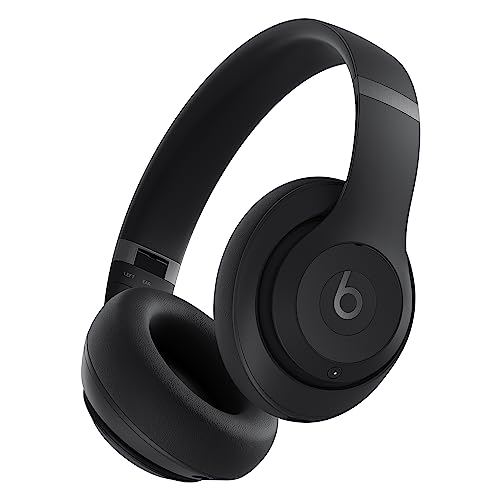
- Over-ear headphones include active noise cancelling and Transparency mode.
- Up to 40 hours of battery life is listed; a 10-minute Fast Fuel charge provides up to 4 hours.
- Includes USB-C lossless audio, a 3.5mm audio cable, and Apple and Android pairing.
Best For: Someone who listens while commuting, studying, traveling, or working.
10. Amazon Echo Show 15 Smart Display
A Shared Family Hub
Amazon Echo Show 15 Smart Display

- 15.6-inch Full HD smart display includes customizable calendar, to-do, weather, and smart-home widgets.
- Built-in Fire TV supports entertainment apps; some content may require subscriptions.
- Video calling includes an auto-framing camera, and a built-in shutter and mic/camera-off button offer privacy controls.
Best For: A household that wants shared calendars, timers, video calls, and entertainment.
11. Apple Watch SE 3 GPS, 40mm
Fitness Goals at a Glance

- Tracks workouts and sleep, with temperature sensing and insights in supported apps.
- Can detect a hard fall or severe car crash and help connect with emergency services, according to the listing.
- Designed to work with an iPhone or Wi-Fi; listed battery life is up to 18 hours.
Best For: An active iPhone user who likes workout tracking and notifications.
12. AULA F75 Pro Wireless Mechanical Keyboard
A Customizable Desk Favorite
AULA F75 Pro Wireless Mechanical Keyboard

- Compact 81-key, 75% layout with Bluetooth, 2.4GHz wireless, and USB wired connections.
- Hot-swappable base supports 3-pin or 5-pin switches; includes pre-lubricated Reaper switches.
- RGB lighting, a multifunction knob, and up to five-device connections are listed features.
Best For: A PC user, writer, or gamer who spends a lot of time at a desk.
Choosing tech gifts for the recipient
Start with the routine the person already has. Someone who works from a laptop may appreciate a docking station that brings displays and peripherals together, while a frequent video caller could use a webcam with autofocus and built-in microphones. For a household, a smart display can make calendars and timers visible in a shared room. A digital photo frame is more personal when family members can contribute pictures through its app.
Consider whether the gift solves a real friction point. A mesh Wi-Fi system is relevant when coverage across the home is a recurring problem. A portable SSD suits someone who handles large files or wants storage they can carry. Headphones, a keyboard, or a projector are easier to match to a hobby or daily preference. For a security camera, think about where it will be used and whether indoor monitoring fits the recipient’s needs.
Match the spend to the use
A smaller tech gift can still feel thoughtful when it supports a specific habit. The four smart plugs make a practical starter set for someone interested in schedules and voice control. A keyboard or webcam upgrades a desk setup; the SSD is useful for files on the move. Larger home purchases such as a mesh system or smart display make more sense when you know the recipient wants that kind of change.
Avoid judging value by feature count alone. Ask whether the person will use the features: multiple display outputs matter to a multi-screen worker, while a family photo frame’s sharing app matters if relatives will send pictures. Features with ongoing costs also deserve attention. For the Arlo cameras, advanced history and detection features require a paid plan after the trial, while basic alerts and live streaming work without one. Some Fire TV apps and content may also require subscriptions.
Check compatibility and make it personal
Before buying, check the devices the recipient already owns. The Anker dock requires a laptop connection that supports DP Alt Mode and Power Delivery, and the listing says macOS mirrors the two external displays. The EMEET webcam connects through USB-A. The Apple Watch SE 3 is intended to work with an iPhone or Wi-Fi. For smart plugs, voice control requires linking the plugs through the Smart Life app first.
A projector gift is best when the recipient has a compatible source, such as a phone, computer, game console, or streaming device. Consider the room and audio setup too: it has built-in speakers and can connect to Bluetooth speakers. For a mesh router, remember that a separate modem is required, and expansion of the mesh uses additional Deco units. For the photo frame, the giver can make the gift more personal by helping load photos or inviting family members to share them, provided setup is welcome.
Personalization can be simple: pair a keyboard with a note about their desk setup, prepare a folder of family photos for the frame, or include a favorite playlist suggestion with headphones. Keep the person’s preferences central, especially for items that will sit in view or be used every day.
Timing and last-minute decisions
Order early enough to allow for setup and compatibility checks, especially for network equipment, cameras, and multi-device desk accessories. A gift that needs an app, account, or smart-home connection may take longer to make useful than a plug-and-play item. Leave time to confirm the recipient’s laptop ports, phone ecosystem, Wi-Fi arrangement, or preferred streaming devices without spoiling the surprise.
For a last-minute choice, favor a gift that fits a known habit and does not depend on a complicated household change. A portable SSD, headphones, webcam, or keyboard may be easier to match when you know the person’s devices. If choosing connected home technology, include a short offer to help set it up after Christmas. That small bit of support can make practical tech feel welcoming from the start.